"Akit is the man. He knows Clipper." (spenta)
"It’s a fantastic blog for any San Franciscan."
(Kevin)
"Your blog is always on point, and well researched!" (Nina Decker)
"Everyone's favorite volunteer public policy consultant..." (Eve Batey, SF Appeal)
"You are doing a great job keeping on top of Translink stuff. Keep up the good work!"
(Greg Dewar, N Judah Chronicles)
"...I don't even bother subscribing anywhere else for my local public transportation info. You have it all..."
(Empowered Follower)
"If anyone at City Hall wants to make public transit better for all San Franciscans, it would be wise to follow Akit religiously...
or, better yet, give him a job."
(Brock Keeling, SFist)
Showing posts with label RFID. Show all posts

Wednesday, February 8, 2012

Hacking a Clipper Card? Easy and Cheap Solutions to Protect Yourself


There's been some word around that someone was able to hack a Clipper card.

I know how to hack a Clipper card, just give me a saw.

Actually, it's the other type of hack, some person was able to find how to exploit the Clipper card by being able to somehow get through the encryption and obtain the data. In the worst case scenario, someone could be able to use that data to make clone cards and either make fake card balances and passes to sell, or steal one's information and make a clone card (similar to someone skimming a credit card's magnetic stripe).

Am I concerned? Sure I am, but I'm protected like an electronically tested condom (which reminds me, time to visit Costco for an economy pack).

There's no fear in this; odds are very low that someone will skim your Clipper card and ride Muni free for the rest of the month. Even then, stealing the info and e-cash balance and trying to get cash back is really difficult: You have to prove to Clipper customer service that you are the registered user of the card. Also, if Clipper knows your card is funded or partially funded with commuter benefits (even just one cent), they are not allowed to cancel the card's balance and mail you a check.

If you are just paranoid, get your tin foil hats and learn about this: There are products on the market that is able to shield your Clipper card from people skimming information. You could wrap it in tin foil, that's a cheap option. There are sleeves that people can use to slip their card in to protect it. But the problem with a tin foil or sleeve shield is that you will have to pull your Clipper card out every time when you want to scan it.

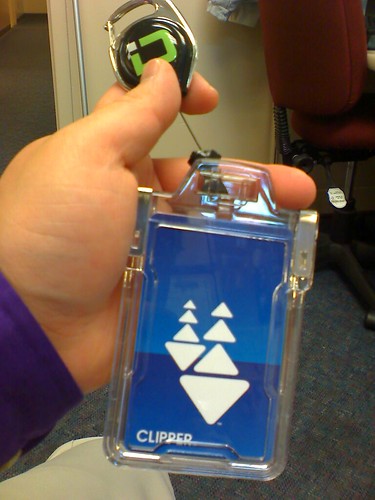
One solution I suggest is what is shown in the picture on this blog post. I use a badge holder. This one I have from Identity Stronghold works fine, and I also added a retractable reel to it so I can hook it to my belt. What makes it easy is you don't have to remove the card to scan, you just squeeze the top of the card to open it, scan the card, and un-squeeze to protect the card. I tried the holder with it protected/secured and Clipper card readers doesn't even know the card is there, but with a little squeeze, the card can be read.

So really folks, there's nothing to really fear. You don't need a replacement card if they come out with the newest generation of cards that are more secure. When more secure measures comes out, hackers always try to outsmart it. But with sleeve or badge holder that is shielded, there's no way to electronically pickpocket you.

Friday, September 2, 2011

No Need to Scan Your Clipper Card Bare Naked


With a lot of people using their Clipper cards, especially on Muni, people are getting the hang of properly tagging their card (not swiping it!) and many are getting used to finding their local vendor to handle purchasing their monthly passes.

While I haven't heard many complaints as of late, I have noticed a more casual observation when people use it to board buses, trains, and enter the metro stations.

Did you know you do not need to tag your Clipper card bare?

Unlike the paper fast pass which must be visually shown to an operator or inserted into a fare gate, there's no need to take it out of your wallet or even keep it in a clear plastic sleeve anymore. As long as you place your wallet, purse, backpack, or any other place holding your blue Clipper card and it's not too far away from the surface of your personal item, the scanner will be able to read through the surfaces to identify your card and handle your transaction.

Even for me, I place my card behind five plastic cards and a small wad of cash, and it still reads perfectly on all card readers, including BART and Muni's fare gates.

But... there are some things that could go wrong:
  • Clipper cards cannot read if the card is scanned while you have: Tin foil (tin foil helmets, the government can't read my thoughts), RFID shielded wallet or product, or if you have another contactless card nearby. Not all contactless cards operate on the same radio frequency as a Clipper card, so you may not have to be concerned, but it's all trial and error.
  • Always remember, one card at a time (especially true if you travel as a group or bringing your kids along). You can't stack two Clipper cards on top of each other, scan them, and expect two confirmations.
  • Sometimes, pulling out your wallet to scan your card is not the best idea as it may be a risk to get robbed or tell a pickpocket where your wallet is located. One option is to buy a super cheap wallet at some discount store and use that as your Clipper card holder, and stow it away in a coat pocket.

Recommendations
I recommend not pulling your Clipper card out and tagging it 'bare' because I feel you put your card at an increased risk of causing damage to the internal data chip and antenna that communicates with Clipper card equipment. As I mentioned before, bending the Clipper card can damage it and render it useless, and nobody wants to hassle getting a replacement. There's a lot of ways you can inadvertently bend your Clipper card and damage it when done 'bare,' from slapping it hard to a card reader to constantly inserting and removing it from your wallet when boarding buses.

By keeping the card in a place where it won't be removed as often, such as a wallet or pass holder, you reduce the risk of damaging the card because you just hold your wallet, purse, etc. to the scanner to read it. For me, by sandwiching my Clipper card between my employee ID and health care plan membership card, there's very little risk of damaging the Clipper card because it makes it nearly impossible to inadvertently bend the card. If you plan to use a dummy wallet to not let criminals find out where you hide your wallet, find some useless plastic cards in your home, like a grocery store card or a gift card with no value.

Normally when I travel, I use this device from Identity Stronghold (see photo) which makes it easy to use my Clipper card by attaching it to my belt and it has a reel to extend it a few feet. It makes it easy to see for fare inspectors, and it's also RFID shielded when kept in the closed position; when I need to scan the card, I squeeze the tabs on the top of the card to expose it just momentarily while it's being scanned.

Monday, December 13, 2010

What's Inside a Muni Limited Use (Clipper) Ticket?

SF Citizen did a great bit after I gave the blogger some advice on how to get the guts out of a plastic Clipper card. All he did was drop the card in acetone and the plastic disintegrated over time. In the end, the only thing remaining was a small bit of copper wire and a chip.

It made me think, how about I perform an autopsy on one of those Muni Limited Tickets made of paper? One person was able to take a photo showing the guts underneath the paper, but I wanted to see the insides for myself.

Here's what I started with:
Muni Limited Use Ticket

I found this leftover card on Monday with no value and decided to simply soak it in a glass of water. In a matter of minutes, the water penetrated the paper layers and I started peeling it off little by little. The way it was constructed is a sturdy piece of paper on both sides, and sandwiched in between is the RFID technology.

Here's what it looks like after peeling off the layers and rinsing it clean:
Inside a Muni Limited use Ticket

The RFID layer contains a ribbon surrounding the edge. This is what is known as the "antenna" as it makes communication contact with the Clipper readers. The chip is the little black dot in the upper right hand quadrant and contains the memory that holds it's serial number, card expiration, and all transactions. The antenna is connected to the chip so it can read and write information.

There's a reason why Muni can't recycle these, it's because the RFID layer is not recyclable.

Since I did wash off the paper layers and bent it a few times, I likely destroyed the card for future use. But it was a cool experiment!

Sunday, December 5, 2010

Clipper Card Reader Meltdowns - Still Not Resolved


I would believe by now, Clipper should have resolved the card reader meltdowns on buses and trains (especially Muni), but it seems it hasn't been resolved. If you don't know what I'm talking about, click here for my first story posted on October 13, 2010.

Fortunately, a Clipper representative wrote a comment on my blog explaining why the readers are beeping like hell (more than one RFID card was read at once) and said it should be resolved in November with a software update.

Um... OK, it's now December and where's this software update? On Sunday, I boarded a M-Ocean View train going inbound and had to get off at the next stop because the beeping was was totally annoying. Luckily for me, a K-Ingleside train was right behind.

Want to see the annoyance in action? Here's one of many clips available on YouTube:


There are also a few people who are complaining on Twitter about it too: Tweet #1 and tweet #2.

Come on Clipper, you can get this annoying problem resolved. Look what the ORCA card organization did, they fixed their readers to say "one card at a time please" which means that the user who used the card reader had more than one RFID card present during the scan. See photo below from Flickr user: Atomic Taco:
ORCA: One card at a time, please

A broken card reader means lost revenue for Muni, puts passengers at risk of receiving a "fare evasion" citation from fare inspectors, and also means a free ride too.

Wednesday, October 20, 2010

Ending 25 Cent Fee for Muni Tickets Costs $2.13 Million Yearly

Inside A Temporary Clipper Pass

Since Friday, October 1st, the SFMTA stopped asking Muni metro patrons to pay a 25 cent surcharge per limited use ticket (LUT) issued by the new metro ticketing machines. This was a bright spot to many people as they complained the 25 cent fee was not fair, but I also argued the plastic Clipper cards issued by the same machines are given out with NO surcharge. To make it even sweeter, I reported the plastic Clipper cards will now be free until June 2011.

But have you ever thought, by Muni waiving the 25 cent fee to offset the re-loadable and reusable paper LUTs, the agency is falling into a deeper financial pit of financial doom?

In item #12 of yesterday's SFMTA Board of Directors meeting, the item is a request to continue the practice to waive the surcharges charged to the customers for the paper LUTs. There's some interesting facts which was discovered in the paperwork:
  1. It was originally conceived that the surcharge would be 25 cents and be raised to 50 cents starting with the 2012 fiscal year.
  2. Each card the SFMTA purchased was originally 35 cents each, however the cost to the agency for each card has dropped to 33 cents.
  3. The revenue generated by forcing passengers to pay the surcharge would be about $1.4 million for charging 25 cents, and $2.8 million by charging 50 cents.
The worst part: If the SFMTA continues the policy to not charge a fee for each LUT issued and if their request to get reimbursed is denied by the Metropolitan Transportation Commission, the agency will have to spend approximately $2.13 million a year on the paper RFID cards.

I'd hate to be devil's advocate, but while the locals are celebrating the waiver of the fee and Muni will go into financial turmoil, why in the hell would people pay a 25 cent surcharge every 90 days for a brand new LUT when Clipper cards are totally free and have much less restrictive policies than the LUTs? Muni could save tons of money if people refused to buy LUTs and just obtained a Clipper card because each card costs $2.11 and comes out of the MTC's budget, not SFMTA/Muni's. Also, by owning a Clipper card for at least 2 years and 3 months, you made up the $2.11 value of the card versus paying a 25 cent surcharge to Muni every 90 days/3 months.

Lastly, here's some fun math to demonstrate how much wasted paper is needed for the vending machines to sell LUTs:
  • Question: If it costs $2.13 million to supply the cards on a yearly basis, and they cost $0.33 each, how many cards does Muni buy per year?
  • Answer: 6,454,545 (or just 6.5 million) cards are issued per year. What a waste of paper!

Friday, August 6, 2010

Clipper Card: Easy Ways to Buy Passes & E-Cash without Hassles


In light of all the hell Clipper is going through, from thousands of angry WageWorks customers not getting their e-passes in time, to Clipper & MTC's public relations crew cleaning up the mess; I'm going to give you ways get your passes and e-cash funds to work every time.

I have little trust in letting my commuter benefits company transfer funds to Clipper
I've had issues with automatic loading, from being added late to just that funny feeling in my stomach that something is going to go wrong. So, I decided to just go to other ways of adding my passes and e-cash with the feeling of instant satisfaction. Once the people lose the trust in automatic loading (whether it be a glitch or fighting between two agencies), they want to find ways that adding value is available instantly on the card.


If you use commuter benefits:
Are you able to change your orders? Certain companies lets you do this over the phone or online. If you cannot make a change to your order yourself, ask your employer (sometimes the HR office) if there are other options you can take other than automatic loading of Clipper e-cash or passes.

After years of experience with Clipper and TransLink and trying various methods, here's the easiest ways to greatly reduce the risk going through another round of hell next month:
  1. Mail order paper passes, that is, if you still can. Good old paper passes are familiar to drivers and fare inspectors. Just be careful of deadline dates the transit agencies set for elimination of paper passes.
  2. Commuter paper vouchers is an easy option; they arrive in the mail about ten days before the new month starts, and you just claim them at most Clipper in-person locations like a local Walgreens. Since the vendor add value machines can add value and passes instantly w/out delay, it also includes a receipt as immediate proof that your passes and/or e-cash was added. If you order a monthly pass days before the new month starts, the pass information is held in the card until the first day of the month when it is activated.
  3. Commuter benefit debit cards is another option if you frequent locations where automated add value machines are located (e.g. all Muni metro stations, Golden Gate Ferry terminal, and Temporary Transbay Terminal). Automated add value machines are just like in-person vendors where adding passes and e-cash is added immediately to the card without the 72-hour delay (or some wild glitch happening again like earlier this month). For Commuter check users, value is added to your personalized debit card about 10-15 days prior to the new month. Warning! Clipper's policy on all debit cards is there is a $2 temporary authorization check for every purchase; the commuter debit card must have at least an extra $2 on it to successfully purchase a pass or e-cash (example: $60 pass must have $62 on card). You'll get the $2 refunded as soon as the payment clears.
UPDATE: The new Muni ticketing machines at all metro stations can issue new Clipper cards for no charge as long as you add a minimum of $2 or buy any pass. If you have an existing Clipper card, you can use these machines to buy passes for all agencies participating in Clipper, and/or add e-cash. These machines still accept cash, credit, debit, and commuter benefit debit cards. But... it will also accept coins too. The old Clipper add value machines have been deactivated and removed from metro stations so they can be installed at Caltrain stations. BART stations should eventually be able to add Clipper card value sometime in early 2011.

UPDATE #2: Commuter benefit debit cards can't be used at most in-person locations such as Walgreens or your favorite local grocery store. The rules are very strict and complex (refer to Commuter Check Card's website). If you don't want to get into trouble, only use the card on automated machines, transit agency ticketing offices, online, or train station ticket vendors like "My Transit Plus" at BART stations.

--End of Update--

In a simple summary, just avoid the three transactions:
  1. Telephone ordering.
  2. Online ordering.
  3. Automatic transfer of funds from the commuter benefits company to Clipper.

For those who do not use commuter benefits but still uses a Clipper card, just stick to buying passes and adding e-cash at an in-person vendor or automated machines. Here's what each service accepts:
  • In-person vendor: Cash, and sometimes checks and credit cards.
  • Automated machines: Cash, debit, and credit cards.

A friendly PSA: Protect the Threat of Theft

Lastly, with the influx of thousands of new cardholders and over two million transactions per month (as per KPIX), there is the potential risk that someone can skim your card's data and rip-off your account. Clipper cards don't have magnetic stripes that can be ripped-off by a tampered ATM machine, they use RFID technology and criminals can use off the shelf devices to steal your data from a distance (that's right, picking pockets has turned 21st century).

I found a company called Identity Stronghold that sells RFID resistant sleeves, wallets, and badge holders. I bought a badge holder that can protect or dramatically reduce the risk of my card being skimmed from thieves, but I can easily let a Clipper reader scan it by squeezing the top of the holder to allow the card to be read for that brief moment. With shipping, it was less than $15, but a small investment to prevent spending hours of hell with customer service and losing a lot of money.

I can't guarantee it will work. I tried the badge holder with my work's proximity card (a really old system in place for nearly a decade) and it was able to read it, but it had to be within half an inch from the reader. Removing the card or squeezing the tabs increased the range to five inches.

Friday, June 25, 2010

Clipper Card Meeting - New Machines, Passes & $53 Million Price Tag


The Clipper/TransLink management board will be meeting on Monday, June 28th at MTC headquarters, and there are some great updates from the documents available to the public:

Based on their meeting minutes for their session held on April 26, 2010, here's information to know:
  • When vehicle operators attempt to restart the software for the Clipper readers (e.g. a malfunction), if done away from the bus/train yard's wireless range, the software would be inoperable for transactions. A patchwork is being corrected. The massive out-of-service card reader problem has caused Golden Gate Transit/Ferry to lose $80,000 in transit fares. Refer to my previous blog posting about the weekend of April 17-18 systemwide crash.
  • WageWorks and Clipper are not on happy terms when it comes to contract terms for peoples' WageWorks account funds being transferred to a Clipper account. The problem is being worked on by both sides, and affects approximately 5,000 people. If all else fails, Clipper will inform customers affected.
  • The board approved several key points, but I'll mention the useful ones: Senior and youth Clipper cards will be permanently free, adults will get a short reprieve on the $5 initial card fee, SFMTA will be able to do more tabling for youth and senior card sign-up, and any Clipper card is in-part or wholly funded with commuter benefits will receive no refund on their card when a customer requests to end participation.

Clipper Card Management Report:
  • As of May 31st, all VTA equipment has been installed, and Samtrans is nearing completion of their Gillig fleet.
  • Card transactions (tagging card) has increased 16.5% in May (62,850) when compared to April 2010, and nearly tripled from last year (May 2009).
  • As of May 2010, there are over 70,000 TransLink cards in the hands of the public.
  • Which transit agency gets the most transactions? Golden Gate Ferry comes first and Muni comes in dead last.
  • The new Muni metro ticketing machines/Clipper add value machines will be installed in August.
  • The new Muni metro fare gates will be installed in September and early October.
  • Clipper's in-person customer service center is delayed, but is confirmed to be in the Embarcadero station.
  • In the future, Clipper may have merchants/vendors with "super" capabilities; they will be able to exchange cards instead of just adding funds.
  • Clipper techies may need to revisit 100 installations of the Clipper technology on Muni vehicles. This is on discussion.
  • BART ticketing machines will be able to add Clipper funds in "early 2011."
  • Golden Gate Ferry plans to automate the ticketing and entry process, and proposed to complete the project by March 2011.
  • VTA's automated ticketing machines (the light rail stops) may be able to add Clipper funds in the future.
  • SFMTA wants to use Clipper cards to pay for city own parking garages.
  • Clipper admits there are problems with Muni's historic streetcar equipment due to electrical power problems, and will spend the next few months investigating and finding a proper solution.
  • The "Phase II Clipper Contract Capital Costs" since the 2002-2003 fiscal year has totaled: $52,632,006 or basically 53 million dollars. Ka-ching!

The best news of all, the Clipper folks are suggesting a pass accumulator program:
The idea is, instead of making people pre-purchase passes, they ride their favorite transit agencies paying e-cash, and if they reach a designated daily, weekly, or monthly purchasing limit, the rest of the rides on the agency for the designated period is free. VTA plans to implement a day pass program using the accumulator system.

For example: Instead of buying a $60 Muni "M" pass, just ride Muni with e-cash and when the transactions total $60 within the designated month, the rest of the rides are FREE. That alone instills confidence in the public so they don't overspend, but also may attract more people to pay for their rides with the Clipper card.

Akit's take: It's a very good concept for individual transit agencies as a way to promote more people to stop paying with coins and bills and go with an electronic option that is quicker. There would be no more guesswork for passengers to consider if paying in cash is a better value than buying a pass. Transit agencies benefit with quicker boarding, reduced printing of transfers, reducing the need for staff to count and sort coins and bills, and reduced maintenance costs on coin/bill fareboxes. For Clipper, there would be no concerns of passengers having problems buying a pass, including myself since all transactions would be e-cash with a threshold limit.

But it does have a unique challenge... how about a regional pass using the accumulator system? If all transit agencies went on Clipper, would it even be possible to get all of the agencies of the consortium to say "yes?" How much would be the maximum limit? Would be it a day pass, weekly, or monthly? Lastly, how would each agency get their share of the money? A good example is BART Plus allows passengers to not just ride BART, but a ton of Bay Area transit agencies under an agreement that each agency gets their share of the money generated from the program.

Thursday, June 10, 2010

Want a Clipper Card on June 16th? Not That Easy for Existing TransLink Users

This Friday, the Metropolitan Transportation Commission's (MTC) Operations Committee will be having their public meeting. On agenda item #6, it is updates from the Executive Director of the MTC about TransLink to Clipper transition.

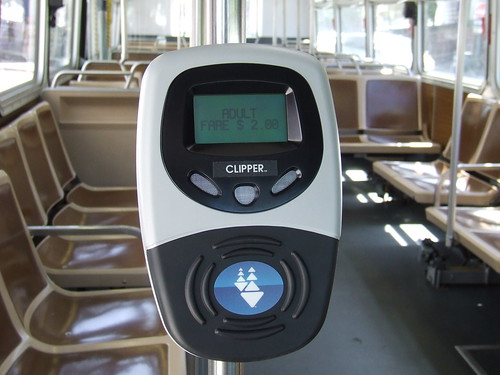
Clipper Reader on Muni 3

Don't expect that new customer service center to be open anytime soon. It's now been pushed to the Fall because they are seeking a bigger space, and will be using Embarcadero BART as their San Francisco service office. They are also considering to open one in the East Bay.


But let's get onto the big topic. Here's where the news gets a little interesting from the Executive Director's memo...

As all of you know, Clipper is official starting on June 16th, and all the vendors such as Walgreens will be able to issue people a brand new blue color Clipper card. For the first three months, the Clipper card will be FREE, instead of paying the $5 initial fee to obtain it.

But not so fast to all you green TransLink cardholders! You won't be getting a replacement card that day or anytime soon.
(Ut-oh! No new toy for their existing customer base, yet!)

The Executive Director states: "For customers who already have a TransLink card but want to have a Clipper card, they can simply use any remaining balance on their TransLink card, acquire a Clipper card at no charge, and the begin using the Clipper card..."

For those who use Autoload, you would need to contact the customer service office in obtaining the new Clipper card.

Hmmm... I'm not liking what he just said. I don't use Autoload and I have a decent e-cash balance on my card. I won't be able to fry all the cash value in the TransLink card for a good while (I have a paper Muni pass), and by the time I deplete my account, the Clipper card fee will return to $5.

Plus, doesn't the MTC want some good P.R. by letting one of their most loyal customers since the start of the TransLink pilot program in 2002 (that's me!), to be one of the FIRST to use the brand new card?

Hey, um... where's my invite to the press conference next Wednesday? Are you going to have one?

Sunday, June 6, 2010

More TransLink to Clipper Updates with Photos


Akit's Complaint Department is proud to be your unofficial source of information about the TransLink/Clipper program: providing insight, advice, tips, and the latest news that you would not likely hear from other news sources. If the folks at TL/Clipper refers their Facebook fans to an article on my blog, they know I'm some kind of legend.

Well... on to the updates.

With only a week and a half until the official change from TransLink to Clipper is completed (June 16), here's some updates on what's going on.

I made an error to the planned transition of the automated add value machines for conversion from the chipped (TransLink) to non-chipped (Clipper) cards. The re-branded automated add value machines still have their card slot, however, modified to be able to read and write to the card without the need of the gold chip. It's a cost savings for TL/Clipper and the MTC because it would cost extra to install a sensor pad reader similar to what BART's automated ticketing machines have. While BART's ticketing machine sensors are not active, they intend to be in the future to allow the adding of funds and other types of purchases.

There's a lot more people using the cards on the Muni system. When I was riding the bus yesterday (Saturday), the beeping sounds happened more often, but the traditional fare media (passes, transfers, and cash fares) are still the majority. If you pay for your rides in e-cash and transfer to another vehicle, the card reader screen now tells you how much time is remaining until the transfer expires. One item that needs improvement is the little screen on the BART fare gates. The balance paid and remaining balance should be in a larger size. The "OK" letters take-over too much of the screen.

Here's some photos of the re-branding:

Clipper Reader on Muni 2
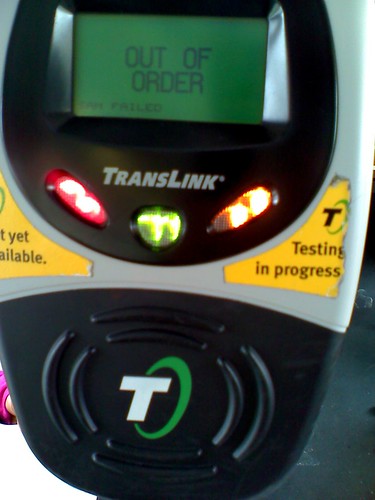
The re-branded vehicle card readers have been done with industrial strength stickers covering the card target spot and the word "TransLink." Let's see how long those stickers will last until someone tries to pry it off.

Clipper Add Value Machine
As I previously mentioned, the automated add value machines' hardware has not changed; but do expect the software to be updated soon because it still says "TransLink."

Thursday, February 11, 2010

Suggest a Better Name for Clipper (TransLink)


KTVU is the first media agency to show the new look to the Clipper card. The color of the card is blue with two white uniquely shaped white colored arrows, and the word "Clipper" on the lower corner in capital letters.

Already, opinion of the name Clipper is not going so well. People on Twitter are posting their anger and it's totally understandable when $1.4 million will be spent on rebranding and promotion. Even people interviewed by KTVU said it is a terrible idea.

What would you name the TransLink card? Or would you even rename it at all?
  • I suggested to name it "The Bay Area Card" which is a simple and unique way to identify our region.
  • Twitter user "dto510" suggested "Transit Bridge" but also likes the old name "TransLink."

If you have any cool names, just leave a comment or you can Twitter me at user @AgentAkit and I'll update the list on this blog.

Thursday, December 31, 2009

TransLink FAIL on BART: Not Available for Today


UPDATE: It now works.

Today has to be the worst day to have TransLink go down for one of the most important transit services to handle the New Years Eve and post "ball drop" crowds... BART.

There is word that TransLink is not accepted on BART today (verified by 511, TransLink, and BART), and the software fixing cannot begin until BART closes down service for the night.

What does this mean for you? You will have to purchase a regular BART ticket at the station, but remember to buy a round-trip ticket so you don't have to wait in a long line to purchase one for the ride home.

There could be a number of reasons why the failure happened, and these are just a bunch of guesses:
  • The software originally written for the gates was set to automatically expire.
  • A type of Y2K style software problem? This happened to some European trains and they simply moved the year back to 1990.
  • The New Year's "Flash Pass" program is cancelled this year, but it makes it even worse to have a dead TransLink program at the same time.
  • In the pursuit of fame, BART's James Fang wants to kill TransLink so he can keep promoting his cell phone payment program... um... $350,000 of your taxpayer money wasted versus a program already set-up (TransLink) and used on three transit systems.
The TransLink management board will likely talk about this incident, and I'll report back on what happened once the details are released.

Friday, December 11, 2009

TransLink to be Renamed "Clipper"


Today is the TransLink management group meeting at the MTC (Metropolitan Transportation Commission) headquarters at 1PM and a piece of new information was released a few days ago as part of today's agenda.

The Executive Director, Steve Heminger wrote a memorandum to the TransLink management group of changing the name of TransLink to something more unique. Mr. Heminger asked his MTC staff of what name should be used, and they recommended to the TransLink managers to call the program "Clipper" and suggests to transition to this new name in mid-2010.

The reason why the MTC suggested "Clipper" is because the name TransLink is used by transit agencies around the world, including Australia, Northern Ireland, British Columbia (Vancouver, Canada), and England. For our electronic pass system to be unique, it requires a unique name that doesn't confuse people that our program is different than others around the world.

Another reason why "Clipper" was chosen is due to San Francisco's maritime history with clipper ships, and is currently a popular attraction to view historical ships around the Wharf.

The TransLink management group will view the new logos and the MTC "will recommend approval to the MTC's Operations Committee of both the new name and a change order..."

To view the memorandum of the brand name change, click here (PDF document).

--------------------

Here's some updated information on what TransLink staff will present to the management today. This contains the useful information that I've taken a look at:
  1. TransLink has successfully automated the web based add value process to have all requests processed within 24-hours, and also automated the history report process.
  2. Samtrans installation of Translink is nearly completed.
  3. TransLink has put out a proposal to upgrade the memory on existing equipment on vehicles, however I've already noticed upgrades on Muni's vehicles (there's a white sticker on the right side of the readers).
  4. Muni and TransLink is considering placing the new pilot program for seniors and disabled customers who are allowed to access BART for the price of a fast pass, as well as the lifeline program on the TransLink card.
  5. Approximately 90 Muni vehicles will need some re-work. While no details are provided, it looks like it could be equipment or wiring causing problems.
The most interesting news is that Golden Gate Ferry is considering to purchase automated gate equipment with TransLink technology to automate the process to board ferries. Basically, their plan is to remove staff from taking tickets and possibly selling tickets, and take advantage of automated gates to only accept TransLink and "limited use" cards for entry to the waiting area. Other ferry agencies around the nation does similar programs where the gate accurately counts how many people are to board the ferry and locks the gates when it reaches maximum capacity.

For more information about the meeting today and all the documents, click here for the agenda.

Monday, November 23, 2009

TransLink Management Meeting Update 11/23 (The Good Stuff)


TransLink's management board had their meeting earlier today and the MTC always posts their agenda online and also a couple of presentations by the TransLink staff to the board.

For the past few meetings, I've been giving you all the juicy details and skipping over the garbage that the public doesn't want to hear (mostly about dollars and cents).

So here's Monday, November 23rd's great information you should know:
  • In October 2009, there was 40,000 transactions, and is over double the amount from last year.
  • As of November 5th, 88 Samtrans buses are equipped with TransLink and continuing. Gillig buses are being pre-wired during the bus building process so TransLink equipment can be installed faster.
  • VTA will start installation in January 2010. It is estimated to be "revenue ready" by April 15th, but the installation may start late.
  • Installation of add value machines at the Transbay Temporary Terminal will be done in early December.
  • For those who transitioned from EZ Rider to TransLink, BART sent out surveys to those people.
  • SFMTA/Muni is continuing to distribute discount TransLink cards (elderly, disabled, and youth).
  • BART is still working on having their ticket machines be able to add funds and should be ready in late 2010.
  • VTA and Caltrain are also working on having their ticket machines to add-value, but has no date of planned completion.
  • TransLink is looking into a contactless only option (no gold chipped cards and no need to insert cards into slot).
  • The elderly/disabled Muni pass program that allows BART access is underway and TransLink is looking into integrating it into their program.
  • TransLink is looking into purchasing handheld readers for Cable Car usage.
  • A proposal by TransLink to add card readers at exit points on the Muni Metro subway sections.
  • Caltrain's monthly parking permit program is considering to be integrated with the TransLink card.
  • The TransLink contractor is working on a computer programming script for transaction history requests so it can be executed faster. TransLink claims they are able to save 500 man hours by taking advantage of computer technology.
Just looking over the documents shows a lot of the same material mentioned from previous meetings.

I don't agree with the idea of adding card readers at exit gates on Muni, unless if the data is being used to track rider patterns to improve service and/or make it easier for fare inspectors.

Lastly, I like the idea of TransLink getting history reports quicker and I hope they will be able to fully automate it online so everyone can review their history reports instantly instead of the few day waiting period.

Sunday, August 30, 2009

Solutions to when Translink "Doesn't Work"


If you have a Translink card and you always think the program is some sort of failure start picking your brain at the reasons why your Translink card is not responding when you "tag" your card.


Let's learn some basic rules:
  1. Always hold your card to the "T" logo or the circular pattern on the BART gate. Wait until you get the beep.
  2. Quickly tapping your card or waiving it around the sensor will not give you the OK to ride. Hold the card steady. This is the most common mistake that people make, and if they did it correctly, they would not be venting their anger.
  3. Don't punch a hole in the card. The antenna is about a half inch around the entire perimeter of the card (put it under a bright lamp).
  4. Don't bend the card.
  5. It's better to maintain your card in a separate sleeve to reduce the risk of bending.
  6. If you put it in a wallet or purse, make sure that the card is the closest one to the sensor. For example, don't stack the card the farthest away from the reader, put it as close as you can to the purse or wallet surface.
  7. Did you add funds and not see it on the reader? You must obey the 72-hour rule for all internet and phone transactions. Read this to learn why.
  8. Green light means OK.
  9. Green AND yellow lights mean your balance is low, but still OK to ride.
  10. Red light means you should try to tag again, you already tagged, denied boarding because you don't have enough funds or went too far into a negative balance, or there's a problem with your account (blocked). Read the message on the reader.

Here's a few complex problems that may happen:
  1. It's very rare, but some of them are not turned-on. Doesn't seem to be an issue on Muni these days because they are always turned-on 24-hours, even if the engine is shut-off.
  2. If you use Autoload, did your credit card expire or you had to cancel it?
  3. Does your wallet or purse contain another RFID card, such as a proximity card or a debit/credit card with the wireless payment feature? Translink readers will not respond if they notice two or more radio signals. Your card must be the only one that's read.
  4. Your new monthly pass didn't show up? Give them a call.
And lastly, if all else fails, call Translink.

--------------------

So... why did I write this posting? Well, this jackass named Brian Zisk wrote some inconsiderate comments about Translink on Facebook. This guy is as just as pissed-off as James Fang of BART when he went on the attack against Translink (SFgate story and my coverage) and the public pushed back really harshly.

I did my best to play devil's advocate (or is it angel's advocate?) and explain that some of his problems are caused by the reasons I've listed above, and some other ones you'll see in the conversation:

Zisk's Initial Posting:
"What a defective program. How did this ever get approved? #fail My TransLink card often fails to work, causing me to pay again in cash even when it's prepaid for unlimited rides for a month.

The card is fragile, and if it cracks, it won't wo
rk, and you'll need to pay to replace the card. If you want to cancel the card because it's costing you more money than a FastPass, you'll be charged. to leave the program.

If you want to ride a cable car, these cards aren't accepted, though a fast pass is accepted at the same price you pay for a Translink.

Hardware and support costs must be much higher than the existing FastPass system. Understand conceptually why it seems like this system might be better, and understand why folks associated with TransLink need to stick up for it, but in practice, folks need to be warned that they will be signing up for a vastly inferior and often frustrating experience if they decide to try out these cards."

Reply from Akit:
"Here's a bit of advice:
--Hold the card at the sensor til' it beeps. If you just wave it around or just tap it for a brief second; it won't respond. Just an extra couple seconds of patience pays off.

--The system has a fail safe feature that your card won't respond to the reader if you also have in the reader's range, a proximity (access) card, or any of those debit/credit cards with the RFID technology.

--Report problems to Translink. Note down the vehicle number or entry point and call them the same day. If nobody reports problems, it will continue on for days and even months.

--The cards should be handled carefully. Carelessness will break the antenna. Never punch a hole into the card.

--You were clearly informed that Cable Cars are not yet equipped to handle Translink. Historic monument laws forbid modification, and therefore they can't install equipment on the vehicles. Handheld readers that can deduct fares are being worked on.
"

Reply from Zisk:
"You can repeat the how to manual, but even the folks most sucking up to TransLink acknowledge that the problem on individual buses can persist for months, as you mention in your post above.

If the real answer is to "hold the card at the sensor til it beeps" as you suggest, muni would grind to a halt as folks stand there trying to make the often failed system work.

If you think that only carelessness will break the antenna, you obviously don't know what you are talking about.


As for insisting that I was clearly informed, your misinformed babbling is totally condescending, and you are not correct in any case.


You all can wave you hands and chant "TransLink works great" over and over, but as it stands now, they system is a huge fail, and it should be shut down before any further money is wasted.

According to some reports, they system was originally scheduled to cost $4 million, but has since ballooned into the hundreds of millions of dollars.
"

Akit's final reply:
"So before you go nuts in your next reply, let me state that this is all based on personal experience (since joining the pilot program in 2002) and some simple searching through public records.


Holding the card until it beeps is what is supposed to happen. Usually it's one second and sometimes two. I've seen people just quickly tap it or waive it around, and they either get no light/tone or the error sound. It doesn't hold-up buses if people do it correctly. I'm hoping they'll do a software upgrade to make it even more responsive.


Can you please explain to me other ways you can break the antenna? The only two I can think of is punching a hole or bending it too much, but that's the same if you did it to a BART ticket.


Tell me, how am I misinformed or telling all lies? Everything Translink has told everyone on how to use it properly and has been supported by many cardholders' experience who feels the program works.

Lastly, get yourself a paper pass or pay cash."


--------------------
The lesson kids is... don't mess with Akit; especially when he's been a Translink cardholder since 2002.

Monday, August 17, 2009

Caltrain accepts Translink - Free E-Cash for New Sign-ups


Today is the first day for the Translink program to allow users to use Caltrain with their green colored cards.

What does this mean for the public? You can now ride many major transit agencies to get around the Bay Area: Muni, AC Transit (with Dumbarton Express), Golden Gate Transit & Ferry, BART, and Caltrain.

Still, the other big players such as Samtrans, VTA, and the other ferry companies needs to join the club, but also the little guys like Vallejo Transit.

How you can participate:
  1. If you do not have a Translink card, sign-up with the Caltrain program and get yourself a free card ($5 value) and $12.50 in free e-cash. You heard me, free money to ride public transit.
  2. If you have an existing card, you can sign-up with Caltrain to partake in surveys and such. But the website does not mention about the $12.50 free e-cash incentive, neither does it say that you won't get it.
  3. Hidden away in the FAQ section of the Translink website is anyone with a Translink card can use Caltrain, regardless if you sign-up to participate in surveys. This is the same arrangement BART is doing, where only select people take surveys, but allows anyone with the card to use the system.

Here's some of the unique rules about using your Translink card on Caltrain:
  1. You must tag-on at your boarding platform, and tag-off at the exiting platform. Failure to tag-on will be caught by the conductor and your ass is getting a citation. Failure to tag-off (if you tagged-on) will charge the maximum one-way fare for Caltrain).
  2. You must have a minimum of $1.25 on your Translink card when tagging-on, regardless of the distance/zones you travel. The maximum the card can go into a negative balance is $10.00, and since $11.25 is the maximum fare on Caltrain, that's why you need to have that $1.25.
  3. Adding more e-cash is not easy; only three Caltrain stations have the addfare machines and must be done in-person. Best suggestions: Autoload program, and automatic loading of transit benefits on monthly basis. You can do phone and web loading, but remember the 72-hour rule.
  4. There's a new "15-minute rule" for Caltrain. If you tag-on at your starting station, but decide to cancel your trip within 15 minutes, just tag your card at the same reader and your money will be fully refunded. After 15 minutes, if you tag-off, you are charged a one zone fare. My suggestion, tag your card within 15 minutes of your train's scheduled arrival, if you hear an announcement that there was a suicide or delay, you can tag-off and find an alternate way to get to your destination.
  5. Lastly, since this is technically in "testing," remember, that if Translink fails to work, get yourself a paper ticket. Caltrain won't give away free rides (they are broke!).
Since I was part of the pilot program in 2002, Caltrain had limited stops you can visit, and passengers had to press the appropriate zone button on the reader to get charged the correct fare. It all worked fine, and this is especially true because the platform card readers are highly reliable and always-on (just like the ones for Golden Gate Ferry), versus the miniature ones used on buses.

Have fun!

Friday, August 14, 2009

Translink works on BART - Here's Video Proof


Riding BART using the Translink card works easily and perfectly. I filmed this after taking my furlough adventure. A high definition version of the video is available.

If you want an easy to understand demonstration to "tag" your card to ride BART (some have complained of difficulty), watch this animation from BART that uses their EZ Rider card.

--------------------

One minor flaw is that I exited the Daly City BART station and transferred to Muni's 28-19th Avenue bus line, but instead of giving me the free ride as agreed in their transfer policy, it charged me the $1.75 and is equivalent to the 25 cent off coupons you get for transferring to Muni between Balboa Park and Embarcadero.

But here's the funny part, Daly City BART's free Muni transfer is valid for only one ride and you don't get a paper transfer to ride a different line (if you use non-Translink media), thereby, I would pay an additional $2.00 to ride a second Muni bus. Since I was charged $1.75 in error, it gave me the 90 minute transfer to take a second bus, and I saved a quarter in the end.

Translink customer service told me that transferring from Daly City BART to Muni gives "two free rides," which is the equivalent of the two-part Daly City BART-Muni transfer. I'm not 100% sure if they mean I get two rides without a 90 minute transfer each, or I don't get one.

Monday, May 18, 2009

BART V.P. Fang Calls Translink "Obsolete" and spends $350,000 on Cell Phone Program


Thanks to Phil Matier and Andrew Ross in today's SF Chronicle, we now know how much BART has wasted on their cell phone RFID program...

$350,000!!!!!

Based on today's article, I thought Matier and Ross used some of my ideas (especially this posting), but Andy replied back and didn't even know about my blog. I wrote back saying "all great minds think alike."

Actually, thanks to those two, they have dug up even more information that I would never have the privilege to obtain. I don't have press credentials, so I always have to get information from either past experience or from my connections.

We now know that BART's Vice President James Fang was the one responsible for this cell phone program. He thought of the idea and got BART to play along, and he even dislikes the Translink program by calling it an obsolete program in the near future.

Oh really? Cell phone RFID has so many restrictions, from people being forced to be under contract with a cell phone company, buying specific programmed cell phones, and maybe a future 10% surcharge for just using this service. Translink is literally FREE (if you get automatic reloading; that waives the $5 card fee).

Octopus in Hong Kong started in 1997 and is now one of the most successful universal transit fare card programs in the WORLD. They are now 12 years old and the technology is not OBSOLETE. Not by a long shot. Plus, they use the original technology from ERG; same as Translink's.

Here is a list of what Octopus has done to stay away from being obsolete:
  • Subway companies upgrades their fare gates with the Octopus card reader pre-installed (old fare gates had an accessory kit installed).
  • Making mini sized cards for keychains, special watches, wristbands, and even cell phone covers with the chip installed.
  • Takes attendance at schools.
  • Decreases crowds waiting to enter at the gates, and quicker boarding on buses.
  • Buy food at many fast-food joints, bakeries, and convenience stores.
  • Expand their services into neighboring cities.
  • Vending machines.
  • Customized cards.
  • Pay taxi fares (under trial).
  • Transit fare discounts for using the card vs. a ticket.
  • Rewards/rebates/discounts at food vendors.
  • Sells a tourist card with preloaded funds and includes rides on the train to the airport.
Translink will follow in the footsteps of Octopus. It is the future of public transporation in San Francisco and the dream is coming a reality sooner than expected. Failure is not an option.

But failure is a definite option for BART VP Fang. How about you cancel your agreements with cell phone providers and refund the $350,000? BART has a huge budget deficit, and this money could be used to benefit BART in many ways, like getting rid of that blue carpet.

My comment is the "most recommended" at SFgate!

Sunday, March 22, 2009

Translink on SF Muni - The Mob Tests the System (and it works!)


As you have read through my previous posting at Akit's Complaint Department, I mentioned that a mob of Translink cardholders were going to test out their green colored RFID fare cards on San Francisco Muni in order to creep the crap out of the bus drivers, station agents, and fare inspectors.

Due to the high winds and cold weather (but no rain!), eight people came out to give Translink one heck of a trial run, or make it better known as a torture test.

Here's all the routes we took:
  1. Starting at Ferry Building, took the F-Market to the California Cable Car stop.
  2. Transferred to the 21-Hayes.
  3. Exited the next stop and boarded the next outbound train at Embarcadero.
  4. Exited at Powell Street (hoping to mess with a fare inspector), and transferred to the 5-Fulton.
  5. Exited in the Tenderloin and walked to Geary Boulevard to transfer to the 38-Geary.
  6. Exited the sardine packed 38-Geary at Van Ness to transfer to the 49-Van Ness/Mission.
  7. Exited at Market street and boarded the next outbound train at Van Ness station.
  8. Exited at Castro station and had a nice lunch at Orphan Andy's.
And the BLT sandwich at Orphan Andy's was delicious!


Unfortunately we were hoping to find a fare inspector, but was not lucky this time. Actually, I rode the metro back to Civic Center to catch BART and a fare inspector was waiting at the escalator. I flashed my card at the guy, and was waived through.

We did not receive any curious questions by onlookers, and the bus drivers didn't mind that several people tagged their card in less than 10 seconds. The only person who I felt was asking themselves: "what the hell?" was the station agent at Van Ness Station.

Want to view the Translink party photos? See below:
http://www.flickr.com/photos/agentakit/sets/72157615775883330/

Here's the video I spent a good hour editing and putting together (it looks great in high quality!) and that video is also posted on the top of this blog entry:
http://www.youtube.com/watch?v=4oe7xBMLG7I

I've been told we will expect some local media coverage from SF Appeal soon.

Dang, that was one fun few hours! You see Muni and Translink? The program is fully ready for roll-out now! Not next year, not six months, it's time to get the ball rolling and the photos and video are proof! Now, what will Muni's PR guy, Judson True, say now?

Monday, June 4, 2007

Translink Card Bay Area - How I would fix it


Ever since the Metropolitan Transportation Commission started their "Translink" program, I was there to help out their pilot program to test-out the program to assure that there will be no major problems to get it running in the future.

For about two or so years, I was primarily a pilot tester for San Francisco's Muni by using the product on their metro trains, but I was also issued a monthly sticker pass that I had to attach to my card to also use on other Muni transit vehicles.

One of the big advantages of the card is that I could load cash onto the card and use it on a limited number of transit agencies in the Bay Area, and I primarily stuck with BART, Golden Gate Ferry, and of course, Muni. I actually took transit more often just to try the card and visit some fun places like neighborhoods outside of SF and Great America.

Yet, out of all that "fun" of experimenting with the card, I hit several snags that made the experience interesting, but also rough on the edges. It was amusing that I contacted the Translink customer service center so many times that the people I talked to knew who I was.

The real problem with the Translink program stems from their poor implementation of the system, especially when it comes to installing the product on every single transit vehicle and station. When I was a tester for the program, the card worked very well on card readers that were permanently installed on train platforms/stations, and even the Golden Gate Ferry terminals. The permanently installed card readers were always on and 100% reliable, and that meant that I had a confident ride on-board public transit. The best experience is by taking the Golden Gate Ferry where all riders, regardless of being a daily user or infrequent user, would get the discount rate that was sometimes nearly 50% off the price of a ride across the bay. Muni Metro stations were not that bad, but because some stations only have one agent at one of the two booths, you sometimes had to tag the card and enter through the emergency gate. Caltrain was not so bad either, but the train conductors were not prepared to read the card, and had to fetch the card reader, which some had a little bit of a challenge to operate.

My solution: Install the program on permanent platforms first. Get it started on Caltrain first, because it will be the easiest to gain confidence with the public. Then, continue with installing it on BART, because the technology is already on the new faregates to read it. Lastly, get the product on the bus vehicles.

But let's talk about the bus vehicles. I've encountered a number of issues, including card readers that were marked "out of service" and not even turned-on. VTA buses were a real problem because it was supposedly installed on certain routes, but the readers were always broken. When they were installed on a majority of SF Muni metro trains, they worked when they were on; but when it was not powered-on, I practically had to teach the driver to turn-on the machine (just press the red button, and no it does not turn on the fire alarm... ok?). The problem with the card readers is that it has a slow startup time, and if you live at a bus terminal where they turn off their engines to not annoy the neighbors, you'd think that Translink sucks because the machine only operates when the engine runs. Plus, with the slow start-up time, would you just pay in cash or just say, I'll wait until the bus driver erupts in rage that he/she can't drive-off because you are still in front of the yellow line?

My solution: Why not put back-up batteries in each card reader, and when the bus is off, the batteries kick in, and when the bus is operating, it charges them. We have those electronic parking meters in San Francisco that runs on batteries (with no recharging capabilities), and they last quite a long time. Even better, upgrade the software for a quick start-up in less than 15 seconds. In just 30 seconds, the bus driver at the terminal is ready to leave after warming-up the engine.

Lastly, I've asked Translink on a number of occasions throughout the years about what's the progress, and they keep saying that it will be ready soon, and then later, and then years later. What's the delay? Can't they just cut the red tape and simply install it? If the price of the project keeps rising, wouldn't it be cheaper on the taxpayers if they just hurry and get it up and running?

I think the news said that the project originally cost about $38 million, but after all these years, it went through the roof to $150 million. If a contractor can rebuild a collapsed section of a highway ramp for a $5 million dollar bonus in less than a few weeks, would it be also worth it to just hire a contractor, train them, and give the company a nice bonus of lets say, $10 million to complete the project by a short deadline? If the project kept slacking-off and completion of the project would be in another two years, more than likely the cost of the project may hit $200 million; so if we are stuck at $150 million today, a $10 million bonus for a contractor to finish in lets say three to six months would be totally worth it.